
Effective WAF Rules Without Breaking the Site
Control 3 in the Practical Web Security for Sitecore AI series. [The intro covered why headless architecture changes where security lives. Control 1 covered security headers and CSP. Control 2 covered secrets and token management.]
The first post in this series made the case that security issues in headless architectures rarely come from deep exploits. They come from small, missed controls at system boundaries. WAF configuration is where that pattern plays out most visibly: teams have a WAF in place, but the ruleset is often overly permissive, or was set to detection mode during the project build phase and never promoted to blocking.
A WAF in detection mode is logging every suspicious request, building up a record of potential attacks, and doing nothing to stop any of them. That's not a security control. It's a monitoring tool that creates the impression of one.
The reason WAFs end up this way is predictable: during the build phase, the team hits blockers. Headless sites, and in particular those built on CMS platforms like Sitecore AI, generate traffic patterns that trigger default WAF rules. Forms don't submit, API calls get rejected. Someone switches the WAF to detection mode to unblock the project, and nobody switches it back. Tuning the rules properly never makes it onto the backlog.
The better approach is to develop with the WAF in blocking mode and tune as you go, so you ship with a ruleset that already fits your application's traffic. Whether you're midway through a build with the WAF in detection mode or already in production, this post covers how to get to active blocking without causing the production incidents that put you in detection mode in the first place.
What This Looks Like in Practice
These are two real-world examples from well-known Sitecore sites, running Next.js where the front-end hosting has not been adequately configured or isn't being managed. The same basic SQL injection test, 'select * from data' passed as a query string parameter. On the first site, the request returns 200 OK. No WAF blocking, no intervention. On the second, the WAF catches it and returns 403 Forbidden.


This isn't an edge case. A misconfiguration like this can easily creep in between annual penetration tests and sit undetected for months. The difference isn't the attack. It's whether the WAF was tuned or just set to detect/bypass because that was the easier path. That's the gap this post is about.
Why Default WAF Rules Break CMS Traffic
The OWASP Core Rule Set (CRS) is the default ruleset on Azure Application Gateway, AWS WAF, Cloudflare, Vercel, Netlify, and Dataweavers' Arc platform. It's well-maintained and broadly effective. The problem is that it was designed for generic web application traffic. A few CRS exclusion plugins exist for traditional CMSs like WordPress and Drupal, but headless architectures and composable delivery patterns aren't covered.
In our experience operating thousands of Sitecore sites and headless ecosystems, three categories of CMS traffic consistently cause the most false positives, and you'll be tuning for these from scratch.
Form POST bodies
Contact forms, multi-step wizards, and free-text fields are common false positive triggers. Users paste URLs into address fields. They use special characters in names and messages. They submit content that legitimately matches injection patterns. A WAF with broad XSS and SQLi rules will fire on this traffic regularly.
Rich text editor payloads
Front-end components that accept rich text input, such as WYSIWYG editors, formatted comment fields, or support ticket forms, send HTML in the request body: formatted text, embedded links, image tags. To the WAF, this triggers XSS detection rules in CRS rule group 941 and SQLi detection rules in rule group 942. The content is legitimate, but without a path-specific exclusion the WAF will flag or block it.
Cookie values
Sitecore and other personalization tools set long, encoded cookie values. But it's not just the CMS's own cookies that cause problems. The analytics and marketing tools running alongside it, like Google Analytics, APM tools like Dynatrace, and even standard authentication with NextAuth.js, all set cookie values that can trigger SQLi and session fixation rules when the WAF inspects cookie headers.
In a typical Sitecore AI deployment, we routinely write cookie exclusions for Google Analytics 4 first-party cookies (FPID, FPLC, FPGSID), APM tools like Dynatrace, and NextAuth.js session tokens, each scoped to specific rule IDs rather than blanket exclusions. The temptation is to write broad cookie exclusions to make the noise stop. That opens a gap far wider than the legitimate traffic you're trying to allow. The tuning approach in the next section covers how to scope these narrowly.
The compounding effect
What makes this worse is how CRS scoring works. CRS operates in anomaly scoring mode by default. Individual rule matches don't block a request on their own. Each match adds to a cumulative score, and the request is only blocked when the total exceeds a threshold. A single form submission or personalization request can trigger multiple rules across both the XSS and SQLi groups, pushing the combined score over the blocking threshold. That's why this traffic generates so many false positives: it's not one rule firing, it's several rules scoring against the same legitimate request.
The Controls: Tuning the WAF Correctly
Tune by route and use case, not globally
The right response to a false positive is never to disable the rule. It's to write an exclusion that is as narrow as the application's behavior allows. Every exclusion should be scoped by path, HTTP method, parameter name, and rule ID. The more specific the exclusion, the less attack surface it opens.
A practical scope hierarchy, from most to least preferred:
- Specific path + specific parameter + specific rule ID
- Specific path + specific rule ID
- Rule ID with application-wide scope, only when the rule is consistently wrong across the whole application
- Disable the rule entirely, almost never the right answer
For example, if rule 942120 (SQL Injection: SQL Operator Detected) fires on a profile image URL field, the exclusion should target that specific rule, scoped to the request body parameter "profileimageurl" on the relevant path. Not a blanket SQLi exclusion across the application.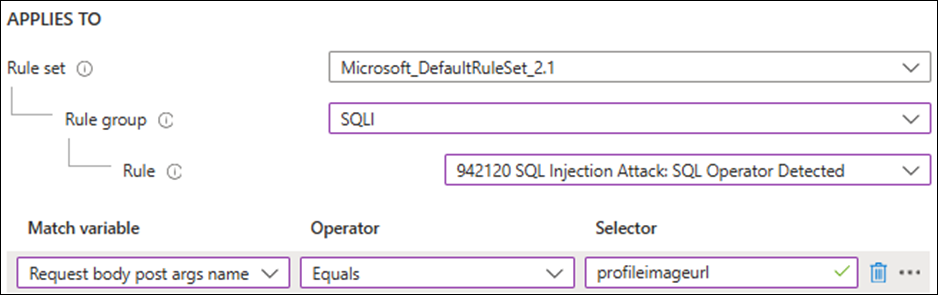
Beyond exclusion scope, consider running different rule profiles for different parts of the application. Your public-facing site has a different traffic profile from your integration and transactional APIs. Non-production environments have different patterns again. A single WAF configuration trying to serve all of these will either over-block legitimate traffic or leave gaps in coverage.
The CRS tuning documentation describes these exclusion patterns in detail. Write exclusions that sit alongside the rules so your configuration survives rule set updates. The CRS docs are written for ModSecurity, the engine that runs CRS natively, but the same concepts apply in managed WAF services. Azure Front Door, Cloudflare, AWS, and Dataweavers' Arc all support full narrow exclusion patterns scoped by rule set, rule group, match variable, and path. Some Front-End-as-a-Service platforms are more limited with how narrow the exclusion can be, but all support a form of exclusions. The goal is the same: scope by path, parameter, and rule ID where your provider allows it.
Lock down non-production properly
Non-production environments are consistently under-protected, and WAF configuration is part of why. Staging and UAT sites are often left anonymously accessible, not through a deliberate decision, but because the sites serve anonymous content and other access controls are simply forgotten. The uat.mysite.com that anyone can reach is more common than it should be. Don't forget your APIs in non-production either; they're often completely open.
The controls that belong on non-production environments, that should all be considered:
- Direct network peering or VPN access, removing public exposure entirely.
- IP allowlisting at the WAF layer, scoped to your office ranges and VPN. Services that need to reach non-production endpoints, like Sitecore Search, can be handled with specific IP allowlist entries rather than opening access broadly.
- Shared secret or token validation at the WAF layer for API endpoints, so that non-production APIs aren't accessible to anyone who finds the URL.
- Lock down CDN access for non-production. You may want to disable caching entirely, but at minimum ensure that CDN-served content is not publicly accessible. Unpublished pdfs, draft content, and test data sitting on edge nodes can be discovered by crawlers, indexed by search engines, or accessed directly. That's not just a content quality problem. Draft content can reveal unreleased products, upcoming campaigns, or strategic direction before it's ready to be public.
Non-production should run the full WAF configuration, not a relaxed version of it. It's the right place to generate the false positive data you need to tune your WAF exceptions, or preferably adjust your code where possible.
Rate limit API and form endpoints
Exclusion tuning handles false positives. Rate limiting handles volume. If your application exposes form submission endpoints, data APIs, or integration endpoints, these should have rate limits applied at the WAF layer. Without them, an attacker can abuse these endpoints at scale: submitting thousands of contact form entries, hammering data APIs to scrape content, or brute-forcing authentication flows.
Rate limits should be scoped by endpoint rather than applied globally. A global rate limit that's permissive enough for normal browsing won't catch abuse on a specific API path. A per-endpoint limit set to a realistic threshold for legitimate traffic will. Most WAF providers, including Azure Front Door, Cloudflare, Arc and AWS, support path-based rate limiting rules.
The Controls: WAF Rollout
Start in detection mode, but with intent
If your WAF provider or managed experience enables CRS paranoia levels, consider starting at a higher level during the tuning phase. Paranoia level 1 is designed for minimal false positives. Level 2 adds more aggressive detection that is more likely to flag legitimate traffic, which is exactly the data you want before promoting to blocking. Arc does this in a fully managed approach, Cloudflare and Azure Front Door support it, whereas most FEaaS platforms don't expose this setting directly, though the underlying rules still operate at PL1 by default. Regardless of paranoia level, the approach is the same. Log everything. Run the full ruleset in non-production to collect real traffic data before you write a single exclusion. The false positives you see in non-production are the ones that would have blocked legitimate traffic in production. That's the data you need.
Review logs weekly. Tune exclusions based on what the traffic actually shows, not on assumptions about what might trigger. An exclusion written without log evidence is usually too broad. One thing to watch for: unresolved false positives don't just create alert fatigue. They can log sensitive data, form inputs, cookie values, and user-submitted content, may end up in plaintext in your WAF logs. That has data protection implications under GDPR and similar regulations. Active tuning isn't just a security concern; it's a compliance one.
Promote rules to blocking in batches
If your WAF currently has everything set to detection mode, don't flip it all to blocking at once. Promote rule categories in batches, with a defined review period in log mode for each batch before promotion. The same applies when making wholesale changes to an existing WAF configuration: stage the changes in batches rather than applying everything in one release.
A practical sequence:
- Path traversal and file inclusion rules first. Low false-positive rate against headless traffic, high impact.
- SQLi rules next. Moderate false-positive rate. Review your form submission and rich text input exclusions before promoting.
- Remote code execution rules. Low false-positive rate outside specific API patterns.
- XSS rules last. Highest false-positive rate in applications that accept user-generated content. Requires careful review of all content submission paths.
Define a rollback trigger for each batch before you promote it. If blocking causes an unacceptable false-positive rate, revert to log mode immediately. A batch that gets promoted and then rolled back is the process working correctly, not a failure.
Alert on anomalies, not just on blocks
Blocking rules only tell you what was stopped. Anomaly alerting tells you when something has changed. Both matter, but teams often set up the first and skip the second.
Set a threshold on WAF blocks per hour against a rolling baseline. A 10-day average works well. A spike above that baseline means one of two things: an attack, or a bad deployment that's generating unexpected traffic patterns. Both require attention. A static threshold misses the context; a rolling baseline catches the signal.
Set this up on both production and non-production environments. In production, a spike tells you something needs investigation now. In non-production, the same alerting catches problems earlier: a newly developed feature that triggers WAF rules will show up in your non-production anomaly alerts before it ever reaches production. That's significantly cheaper to fix than discovering it post-release when users start hitting blocked requests.
The signals worth alerting on:
- Sudden increase in blocks per hour against your rolling baseline.
- A new rule ID appearing in logs that wasn't firing previously. This often indicates a new feature or integration that wasn't tested against the WAF configuration.
- A spike in anomaly scores that stays below the blocking threshold but is trending upward. Requests accumulating score without being blocked today can become blocks tomorrow if you add or promote rules.
- Block rate increasing on a specific path or API endpoint, which can indicate either targeted attack traffic or a deployment change on that route.
The goal is to make your WAF operationally visible, not just a policy that runs silently until something breaks.
GraphQL and REST: App-Layer Protections
WAF rules operate on HTTP traffic patterns. They don't understand the semantics of a GraphQL query or the structure of a REST response. If your application exposes its own GraphQL or REST endpoints alongside the Sitecore AI Edge APIs, there are app-layer protections that sit outside the WAF's reach.
Disable GraphQL introspection in production. Introspection is a built-in GraphQL feature that returns your full API schema, every type, every field, every relationship, to anyone who can reach the endpoint. In development it's essential for tooling. In production it's a reconnaissance tool. Every major GraphQL server framework supports disabling introspection through configuration, whether you're building in Node.js, .NET, or anything else. Do it at the application layer where it's reliable and complete. You can add WAF rules that block __schema and __type in request bodies as an additional layer, but that's string matching rather than schema-aware inspection and shouldn't be your primary control.
Enforce query depth and complexity limits. Without them, a GraphQL endpoint accepts arbitrarily nested queries that consume disproportionate server resources. This is both a performance and a security concern: it's a vector for application-layer denial of service that WAF rules won't catch. Most GraphQL frameworks provide this as a validation rule or middleware option. Set a sensible maximum depth and enforce it.
Don't expose API documentation in production. The same principle applies to REST: Swagger and OpenAPI documentation endpoints serve a useful purpose in development. In production they document your attack surface. Disable them or restrict access.
A Practical Check
Before moving to the next control area, take stock of where your WAF stands:
- Confirm whether your WAF is in detection or blocking mode, and for which rule categories.
- Review the last 30 days of WAF logs for your highest-volume false positives.
- Check whether any rules have been disabled rather than tuned, and document why.
- Confirm that non-production environments have WAF coverage, IP restrictions, and CDN access controls in place.
- Verify that anomaly alerting is configured on both production and non-production environments.
The goal isn't to have a WAF. It's to have one that's actively blocking attacks rather than logging them, without blocking the marketing team or breaking the site.
What's Next
The next post covers pipeline and supply chain security: how to make security scanning consequential rather than advisory, and how to catch credential exposure, vulnerable dependencies, and code issues before they reach production.
Control 4: Pipeline Security: Making Scanning Consequential.