
Security scanning tools don't protect you. Pipeline gates do.
Control 4 in the Practical Web Security for Sitecore AI series. [The intro covered why headless architecture changes where security lives. Control 1 covered security headers and CSP. Control 2 covered secrets and token management. Control 3 covered WAF tuning.]
The first post in this series made the case that security issues in headless architectures rarely come from deep exploits. They come from small, missed controls at system boundaries. Pipeline security is where the pattern is most deceptive: teams have scanning tools installed, dashboards with findings, and a penetration test that runs once a year. From the outside it looks like security testing is happening. But if none of it gates a release, none of it is actually a control.
Annual pen tests find issues months after they ship. Teams add dependencies weekly but only audit them quarterly. Security scanning exists but it's a separate process someone runs when they remember, or a dashboard nobody checks. The gap between "we have a tool" and "it actually blocks a release" is where vulnerabilities live.
That gap is more dangerous now than it was a year ago. Supply chain compromises like Axios and TanStack moved in hours. If your security testing only runs on a schedule, you're always finding out too late.
This post covers what categories of security testing matter, where each one belongs in your delivery pipeline, why supply chain risk has changed the urgency, and how to build a hotfix path that actually works when you need it.
The 5 Categories of Security Testing in Your DevOps Process
Before getting into pipeline placement, it helps to be clear on what each category actually does. Teams often conflate them or assume one covers the ground of another.
| Category | What it does | Tools (examples) |
| SAST (Static Application Security Testing) | Scans your source code for vulnerabilities without running it. It catches injection patterns, insecure defaults, and misconfigurations at the code level. |
SonarQube Cloud, GitHub Advanced Security (CodeQL), Fortify, Snyk Code, Mend. |
| DAST (Dynamic Application Security Testing) | Tests a running application by simulating attacks against it. It finds what SAST can't: broken authentication, missing headers, exposed endpoints. DAST takes time because it's actually probing the running application, but it catches runtime issues that static analysis will never see. | Fortify WebInspect, ZAP. |
| Secret Scanning | Detects credentials, API keys, and tokens in code before they're committed or after they've already landed. We covered this in Control 2, but it belongs in the pipeline too. | GitHub Advanced Security, GitGuardian |
| Dependency Scanning / SCA | Checks your packages and their transitive dependencies for known CVEs. In a typical Next.js Sitecore AI build, your code is the minority of what you ship. Hundreds of packages, most of which you've never reviewed directly. This is arguably the highest-leverage scanning category right now. | Dependabot, Snyk, Renovate, npm audit, GitHub Advanced Security, Mend. |
| AI SAST | An emerging category where reasoning models identify logic errors, broken access control, and context-dependent vulnerabilities that rule-based tools fundamentally can't express. This is the fastest-moving area in security tooling right now, and we'll cover it in detail later in this post. | Claude Security, GitHub Copilot Code Review. |
One thing worth checking before you buy anything new: GitHub Advanced Security appears in three of those categories. It covers SAST (via CodeQL), dependency scanning, and secret scanning in a single license. Snyk and Mend similarly span multiple categories. Audit what you're already paying for before adding another tool.
When to run what?
The most important decision in a security pipeline isn't which tools to use. It's where in the delivery flow each tool runs, and what happens when it finds something. Scanning that doesn't gate a release is advisory, not a control. The pipeline examples here are based on patterns for Sitecore AI headless deployments, but the structure applies to any modern delivery pipeline.
Pull Request (pre-merge)
Secret scanning, SAST, and dependency checks belong here. The goal is to fail the PR, not the build. Catch the issue before it lands in the main branch, not after. A security check that only runs post-merge has already lost the most important battle: keeping the vulnerability out of the shared codebase.
These checks need to be required status checks, not informational annotations. A finding should prevent merge until it's resolved or explicitly suppressed with a documented reason.
Build (post-merge / CI)
Container and artifact scanning where relevant. Validation that no new critical or high vulnerabilities were introduced by the merge. This is a belt-and-braces check. The PR gate should have caught most things, but build-time scanning provides a second pass on the integrated result.
This is also where dependency scanning should run a second pass. A dependency that passed the PR check may have a newly disclosed CVE by the time the build runs. Two PRs that each pass individually can also introduce a conflict or new transitive dependency when merged together. The post-merge scan validates the integrated dependency tree, not just what each PR proposed in isolation.
Staging / SIT
DAST runs here, against a running environment. It takes time because it's actually probing the running application. In a real Sitecore AI headless pipeline, the DAST scans can run for 30 to 60 minutes against the System Integration Testing environment. That's also where header validation, authentication checks, and route smoke tests belong. This is also where your WAF tuning data comes from: real traffic patterns in a realistic environment before anything reaches production.
Release
Monitored rollout, alerting, and a tested rollback path. Production deployment should have a manual approval gate. Nothing ships without someone signing off. If a deployment introduces a regression, security or otherwise, you need to be able to back it out fast. A rollback path that hasn't been tested isn't a rollback path.
The pattern across all four stages: the scanning tools from the categories table above are plugged into real pipeline stages with real gates. A dependency scan that flags a finding in your Pull Request Checks isn't a problem. That's the system working as intended.
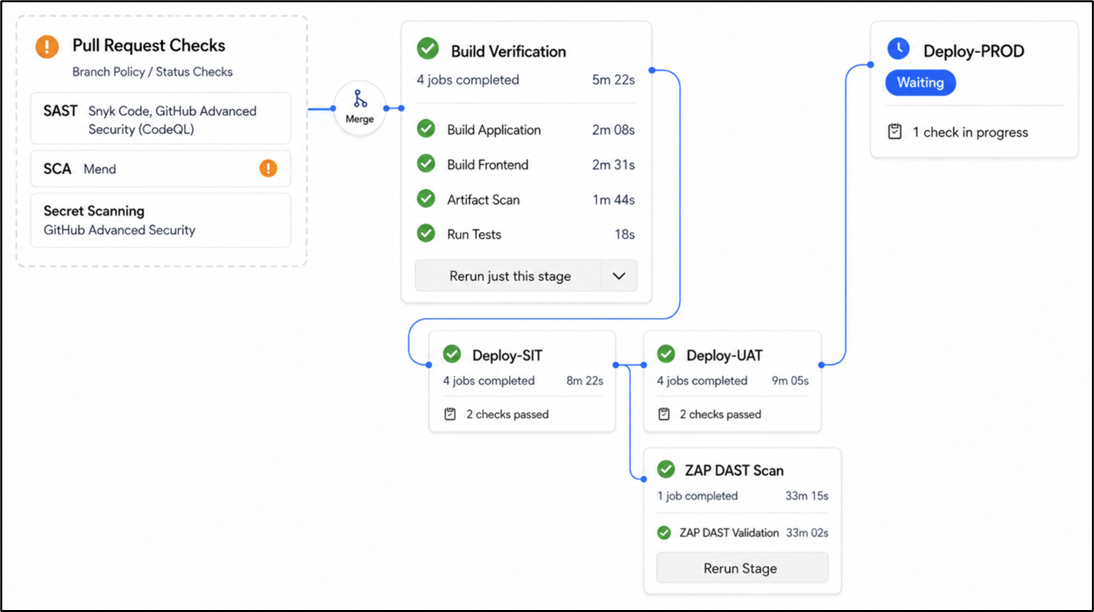
In this example, the Mend SCA check in Pull Request Checks flagged a medium-severity dependency finding. The policy is configured to block on critical and high severity CVEs but allow medium and below to proceed with a warning. If the finding had been critical or high, the policy would have blocked the merge and the code would never have reached the build pipeline. Block on what's dangerous, warn on what needs attention, track both.
The pipeline structure above applies to all five categories. But two areas are evolving fast enough to warrant a closer look: supply chain security, where the threat landscape has shifted dramatically in the last twelve months, and AI-assisted security testing, where the tooling is changing what's possible to detect. We'll go deeper on both.
Supply Chain Risk Is No Longer Theoretical
OWASP's 2025 Top 10 introduced Software Supply Chain Failures as a distinct entry at number three. Your code is the minority of what you ship. A typical Next.js Sitecore AI project pulls in hundreds of transitive dependencies. Each one is a trust decision you've made without reviewing it directly.
Three recent incidents show why this matters, and why each one requires a different control.
Axios (March 2026)
Axios, one of the most widely used JavaScript HTTP clients with 70 million weekly downloads, was compromised by a state actor (Sapphire Sleet). The attack didn't modify the Axios source code. It added a malicious transitive dependency called plain-crypto-js to the package manifest. Most applications that were exposed had no visibility into what their dependency tree actually contained. Dependency scanning and lock file review are the controls here.
TanStack (May 2026)
The TanStack Router compromise took a different approach entirely (TanStack Router is a common dependency in React and Next.js projects, including Sitecore AI headless builds). The attacker didn't need any npm credentials. They poisoned the GitHub Actions build cache through a pull request from a fork, exploiting a known vulnerability in the pull_request_target workflow pattern. When the legitimate release workflow next ran on main, it restored the poisoned cache. The malware extracted the OIDC publishing token from the runner's process memory and published 84 malicious versions across 42 packages in under six minutes. The payload harvested AWS credentials, GCP metadata, Kubernetes tokens, SSH keys, and npm tokens from any machine that ran npm install. It also self-propagated by looking up other packages the victim maintained and republishing them with the same injection. Dependency scanning alone wouldn't have caught this. The attack vector was the build pipeline itself. Pipeline hardening, workflow audit, and pinned action references are the controls.
polyfill.io (2024)
The polyfill.io domain was sold. The new owner turned a legitimate CDN into a malicious one. Hundreds of thousands of sites that had embedded it directly began serving malware to their users overnight. The code hadn't changed. The ownership had. Content Security Policy and Subresource Integrity are the controls here, both covered in Control 1 of this series.
The common thread: each of these attacks exploited a different trust boundary. Axios exploited trust in your dependency tree. TanStack exploited trust in your CI/CD pipeline. polyfill.io exploited trust in a third-party CDN domain. No single scanning tool catches all three. That's why the pipeline needs multiple categories of testing at multiple stages.
The Controls: Making Dependency Management Work
The supply chain examples above show what happens at scale. The controls are more routine than dramatic, but that's the point. If dependency management is something your team does consistently, the impact of any single compromise shrinks. In a Sitecore AI headless build, where the application pulls in hundreds of npm packages across Next.js, Sitecore SDKs, and the marketing technology stack, dependency management isn't optional.
Automate dependency alerts on pull requests. Tools like Dependabot, Renovate, and Snyk can surface vulnerable dependency updates directly on PRs, in context, at the moment the change is being reviewed. That's the right time to catch them, not in a weekly email digest that gets skimmed and archived.
Review new sub-dependencies, and enforce a minimum release age. Supply chain attacks often arrive through transitive dependencies rather than direct ones. The Axios compromise added a malicious package called plain-crypto-js that most teams would never have reviewed. The TanStack attack published 84 malicious versions that were detected and removed within hours, but any automated pipeline that pulled them during that window was compromised. Manually reviewing every new transitive dependency isn't realistic. What is realistic is enforcing a minimum release age policy: don't allow your pipeline to resolve any package version published less than a set number of days ago. pnpm 11 now defaults this to 24 hours. npm supports it via --min-release-age. Dependabot supports it natively. This gives the community and security researchers time to detect and flag malicious packages before your builds can pull them in. Most supply chain compromises are caught within 24-48 hours. A release age policy of even a few days puts you on the safe side of that window.
Don't ignore vulnerability alerts. Triage them like bugs. The most common failure mode isn't missing the alert. It's treating alerts as background noise. If your pipeline generates fifty medium-severity findings and nothing ever gets actioned, the team learns to ignore the alerts, including the critical ones.
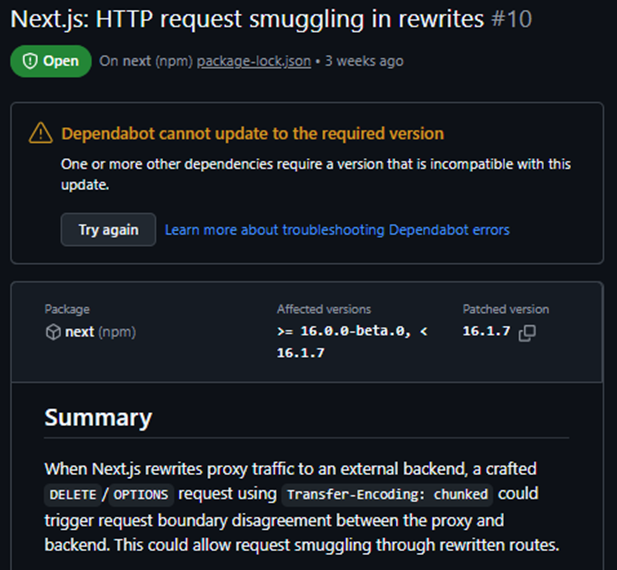
An example of a real Dependabot alert for a Next.js HTTP request smuggling vulnerability. This needs to be triaged and actioned, not left open.
Run vulnerability scanning in CI. Fail the build on critical findings. Start by blocking on critical severity only. Once those are clean, lower the threshold to include high. Trying to block on both from day one with an existing backlog will generate enough friction that the team disables the check entirely. Medium and below should be tracked with resolution timelines, not used as build gates.
Commit your lock files. Lock files ensure deterministic installs. Everyone gets the same dependency versions. CI gets the same versions. Configure your CI pipeline to fail if the lock file is out of sync rather than silently updating it. Without a committed lock file, your package manager can resolve different transitive dependencies depending on timing and registry state, which is exactly the kind of drift that makes supply chain attacks harder to detect.
Make dependency updates routine, not events. Auto-resolve patch updates to save time. Review minor and major version bumps deliberately. A major version bump needs human eyes. If updating a dependency is painful, slow, or requires a full sprint cycle, it won't happen regularly. The backlog grows, the risk compounds, and when something critical does hit, you're patching across months of drift instead of a single version bump.
Patching Out of Sprint: The Hotfix Problem
Critical CVEs don't wait for sprint planning. The Axios compromise didn't give teams two weeks' notice. The TanStack attack published and was detected within the same hour. If a supply chain incident hits a package in your dependency tree, the question isn't whether you need to patch. It's how quickly you can ship the fix.
If your team found out Monday morning, how long would it take to get a patched version into production? Most teams don't know the answer to that question until they need it, which is the wrong time to find out.
A working hotfix path needs three things:
- A branch strategy that bypasses the normal release train. A hotfix branch off main that doesn't require a full sprint cycle to merge and deploy. The pipeline still runs security checks and still hits a test environment, even on the expedited path. Skipping checks to move fast is how hotfixes introduce new problems.
- A documented rollback path that someone has actually tested. If the fix itself causes a regression, you need to back it out without a second emergency.
- Dependency updates that are routine, not events. If patching a package is a painful, high-friction process, it won't happen promptly. If it takes a week to ship a dependency bump, you're exposed for a week after the CVE becomes public. The teams with the shortest patch cycles are the ones who have made dependency updates boring: automated PRs, fast pipelines, clear ownership.
Test your hotfix process before you need it. Ship a no-op change through the expedited path. Measure the elapsed time from commit to production. If it takes more than a day, fix the bottlenecks. A hotfix process that has never been rehearsed will fail under the pressure of an actual incident.
AI-Assisted Security Testing: What's Changed and What's Coming
There has been significant attention around AI-assisted vulnerability discovery in the last twelve months, and for good reason. Frontier AI models are now capable of finding security flaws in source code that traditional tools and human reviewers have missed for decades.
Much of this attention has centered on Project Glasswing, an Anthropic-led initiative backed by major technology, security, and infrastructure companies. The model behind it, Claude Mythos Preview, has surfaced over 10,000 high or critical-severity vulnerabilities since its April 2026 launch. By June 2026 the program had expanded to approximately 150 organizations across 15 countries, including sectors like power, water, healthcare, and communications.
What makes frontier models different from traditional SAST is not just that they find more bugs. It's that they reason about code rather than pattern-match against it. They can correlate across seemingly disconnected issues and identify vulnerability chains that no individual rule would catch. They understand what code is trying to do, not just what it looks like.
The real-world results are grounded, not hype. Cloudflare pointed Mythos at live code across critical infrastructure and shared both what it found and what the operational work around it needs to look like before it can scale. Daniel Stenberg, the creator of curl, had Mythos scan curl's 176,000-line C codebase and it found one confirmed vulnerability (severity low) alongside roughly twenty bugs. That sounds modest until you consider that curl had already been scanned by multiple AI tools that collectively triggered over 200 bugfixes and a dozen CVEs. The easy bugs were already gone. Stenberg's conclusion is worth quoting: AI-powered code analyzers are significantly better at finding security flaws than any traditional tools. Not using them means you leave adversaries time and opportunity to find and exploit the flaws you don't find.
That's the real message. This isn't about one model. It's about a category shift. Frontier models are being used for vulnerability discovery at a scale and depth that wasn't possible a year ago, and teams that don't adopt AI-assisted security testing are giving attackers an advantage.
The distinction that matters
Traditional SAST tools pattern-match against known vulnerability signatures. They're fast, deterministic, and good at catching common issues like SQL injection patterns, hardcoded credentials, and insecure defaults. But they can't reason about what your code is trying to do. A business logic flaw, a broken access control check, a data flow issue that spans multiple files: these require understanding context, not matching patterns.
AI SAST uses reasoning models as part of the detection process itself. Instead of asking "does this line match a known vulnerability pattern?" it asks "what is this code doing, how does data flow through it, and could that behavior lead to a security problem?" That catches a fundamentally different class of vulnerability.
Neither replaces the other. Traditional SAST catches known patterns at scale and speed. AI SAST catches the logic errors and context-dependent vulnerabilities that rules can't express. The teams with the strongest coverage will run both.
What's available now
Claude Security (previously Claude Code Security) is now in public beta for Claude Enterprise customers, powered by Claude Opus 4.7. It scans codebases using reasoning models that trace how components interact, follow data flow, and catch complex vulnerabilities that rule-based tools miss. Every finding goes through multi-stage verification where the model attempts to prove or disprove its own findings, reducing false positive noise. Recent updates added scheduled scans, directory-level targeting, and integration with Slack, Jira, and existing tracking systems. Access for Claude Team and Max customers is coming soon. Opus 4.7's capabilities are also being embedded into security platforms from CrowdStrike, Microsoft Security, Palo Alto Networks, SentinelOne, and Wiz.
GitHub Copilot Code Review takes a different approach, blending LLM detection with deterministic tools like ESLint and CodeQL directly in the pull request workflow. It gathers full project context including directory structure and cross-file references. Recent updates added severity labels, custom review instructions per team, and Azure Repos support. It's strongest as a complement to dedicated SAST, not a replacement. If your team is already on GitHub, it adds a security layer to PR review with minimal configuration.
What this means for your team
The practical implications are already here, regardless of which specific tools you adopt:
- The ability to apply patches quickly is no longer optional. As AI-driven vulnerability discovery scales, the window between a vulnerability being found and being exploited is shrinking. Everything we covered in the hotfix readiness section becomes more urgent, not less.
- Running vulnerability tooling in your pipeline is now a must-have. This includes traditional SAST for pattern-based detection, and now AI tooling for logic-level gaps. Every time you check in code, SAST tools check for known security patterns. AI tooling looks for logic gaps that equate to security issues.
- Actively checking dependencies matters more than ever. As AI tools discover more vulnerabilities in the open-source packages you depend on, you need tooling that tells you immediately when a package in your dependency tree has a newly disclosed issue.
- Interim workaround measures need to be fast. With widespread issues, a workaround is often required before an official patch is released. This typically means blocking specific traffic patterns at the network layer, which ties directly back to the WAF controls we covered in Control 3.
A Pipeline Practical Check
Before wrapping up the series, take stock of where your pipeline stands:
- Is dependency scanning running on every PR, or just in the build? Is it gating merges or just reporting?
- Do you have SAST active and configured to fail on critical findings, or is it running in advisory mode?
- Are vulnerability alerts being triaged, or are there dozens of unresolved Dependabot alerts sitting in your repos right now?
- Is there a minimum release age policy enforced on your package manager?
- Are your lock files committed and is CI configured to fail if they're out of sync?
- Has your hotfix path been tested? How long does it take from commit to production on an expedited release?
- Are you running any form of AI-assisted security review on PRs or codebases?
The Pattern Across All Four Controls
Looking back across this series, the same pattern appears in every control area.
- Security headers and CSP: teams believe they're covered, and the browser is operating without constraints.
- Secrets and token management: credentials are in the right place at launch and drift into the wrong places over time.
- WAF configuration: the ruleset is deployed, running in detection mode, and has been since the build phase.
- Pipeline scanning: the tools are installed, the dashboards have findings, and nothing is blocking a release.
In every case, the gap isn't awareness. It's enforcement. Controls that report without blocking, that alert without acting, that exist without being wired into the delivery flow, provide the appearance of security without the substance of it.
These are the patterns we see consistently across Sitecore AI headless and composable implementations. The architecture is modern. The security gaps are predictable. Headless architecture didn't make security harder. It made it more distributed. The controls are the same. What changed is where they need to live and who owns them.
Five Things to Check on Monday
If you want a concrete starting point rather than a full program, here's a five-minute audit that will tell you where you stand:
- Scan your site on securityheaders.com for your grade. Use CSP Evaluator for a more detailed read on your Content Security Policy.
- Check your repository for exposed secrets: API keys, NEXT_PUBLIC_ variables used for server-side values, committed .env files, hardcoded fallback strings.
- Check your WAF: is it logging, blocking, or neither? If you don't know, that's your answer.
- Open your pipeline: is dependency scanning gating builds or just reporting? Is SAST active? Are vulnerability alerts being triaged?
- Check your hotfix path: does it exist? Has it been tested? How long does it take from commit to production?
Most teams find at least one significant gap in that list. That's the point. Now you know where to start.
This series was built from lessons operating thousands of Sitecore and composable Sitecore sites. The controls aren't theoretical. They're the gaps we see teams trip on repeatedly, and the fixes that work in production.