
Self-hosting a headless front end costs little to start and a lot to run. Here's what it adds up to over three years, and where Arc comes out ahead.
Short answer: for a typical mid-size site, running a headless front end yourself on Azure costs roughly $250K to $550K over three years, and $350K to $800K once you add on-call cover. Most of that is people: 44 to 100 hours a month of DevOps, security and incident work. Arc by Dataweavers includes that work, and for most teams it costs less over three years.
What does total cost of ownership mean for self-hosting?
Total cost of ownership (TCO) is the sum of every cost a decision creates, from the day you start building to the day you replace it. With a headless CMS, the vendor runs the content platform, but the front end your visitors see is yours to host. When you host that front end yourself, the upfront price is close to zero. Almost everything you pay comes later, and most of it is paid in your team's time.
That is why DIY estimates for headless hosting tend to come in low. The cloud bill is visible: it arrives monthly and fits neatly in a spreadsheet. The work of running the rendering host, pipelines, security and monitoring is spread across people's calendars, so it rarely gets counted.
A practical way to see the full picture is to ask what the platform needs from you at each stage of its life:
- Building it. Design, infrastructure, pipelines, security controls and testing before the first page goes live.
- Running it. Releases, patching, cost management, monitoring and keeping every environment in line.
- Fixing it. Incidents, root-cause work and whoever is on call when something breaks at 2am.
- Keeping it current. Framework upgrades, new regions, security reviews and replacing the knowledge that leaves when people do.
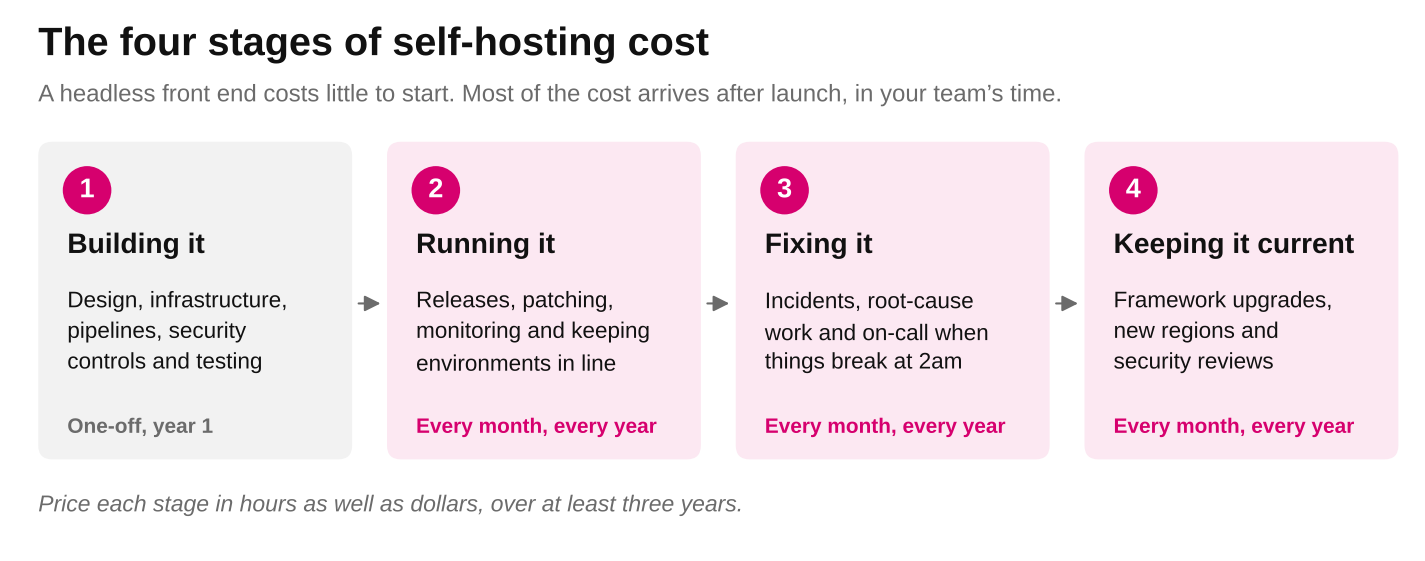
Price each stage in hours as well as dollars, and give it at least three years. A build that looks cheap in year one can turn out to be the most expensive option by year three.
This post applies that view to running a headless front end yourself on Azure, and shows the point where Arc becomes the more cost-effective choice.
What you actually host with a headless CMS
A headless content management system (CMS) such as Sitecore, Contentstack or Optimizely manages your content. With a SaaS CMS, the vendor runs the CMS for you. The website your visitors see is a separate front-end application, usually built in Next.js, that runs on a rendering host: the servers and services that turn DXP content into live pages.
That rendering host is yours to run. So are the pieces around it: the CI/CD pipelines that ship code, the CDN and web application firewall (WAF) in front of it, monitoring, security patching, multi-region failover and whoever answers when something breaks.
What goes into the cost of DIY headless hosting
For a DIY build on Azure, those stages turn into these cost lines. All figures are rounded.
- Set-up. Roughly 300 to 600 hours to design and build the platform, including front-end hosting, CDN and multi-region. At $100 an hour that is $30K to $60K in year one.
- Azure consumption. Around $25K to $40K a year paid to Microsoft for compute, networking, CDN and security services. Azure Front Door Premium, which you need for a managed WAF, starts at $330 a month on its own.
- DevOps, security and incidents. 44 to 100 hours a month of ongoing work, based on the Dataweavers Arc business case. That is roughly $50K to $120K a year.
- 24x7 cover. If the site matters out of hours, someone has to be on call. A stipend-based rotation runs roughly $35K to $80K a year.
Why $100 an hour? The US Bureau of Labor Statistics puts median software developer pay at $135,980 (May 2025). Add about 30% for benefits and spread it over 1,800 working hours and you get roughly $98 an hour. Use your own rate if it is different; the method still holds.
Three-year TCO: DIY on Azure vs. Arc
Here is how it adds up for an illustrative mid-size site: 3 environments, 2 Azure regions and about 4.5 million page views a year.
| Cost line | With Arc | Your team builds and runs it |
|---|---|---|
| Set-up one-off, year 1 |
Arc onboarding part of your quote |
$30K-$60K 300-600 hours |
| Platform | Arc subscription DevOps, security and support included |
Your team builds it |
| Azure consumption paid to Microsoft |
Paid to Microsoft MACC-eligible |
$25K-$40K / yr |
| DevOps, security and incidents | Included | $50K-$120K / yr 44-100 hours a month |
| 24x7 cover (optional) | Optional 24x7 Premium support | $35K-$80K / yr on-call rotation |
| Year 1 | One subscription plus Azure consumption | $100K-$220K $140K-$300K with on-call |
| 3 years | Quoted to your sites and traffic | $250K-$550K $350K-$800K with on-call |
Rounded and indicative. Excludes DXP licenses and site development. Use your own rates and hours.
At the lean end, DIY can look cheaper. At the busy end, it costs a lot more. The question is which end your team will actually live at.
When does Arc cost less than DIY hosting?
For this site, Arc costs less over three years once your team would spend more than roughly 50 hours a month running the platform with 24x7 cover, or about 65 hours a month without it.
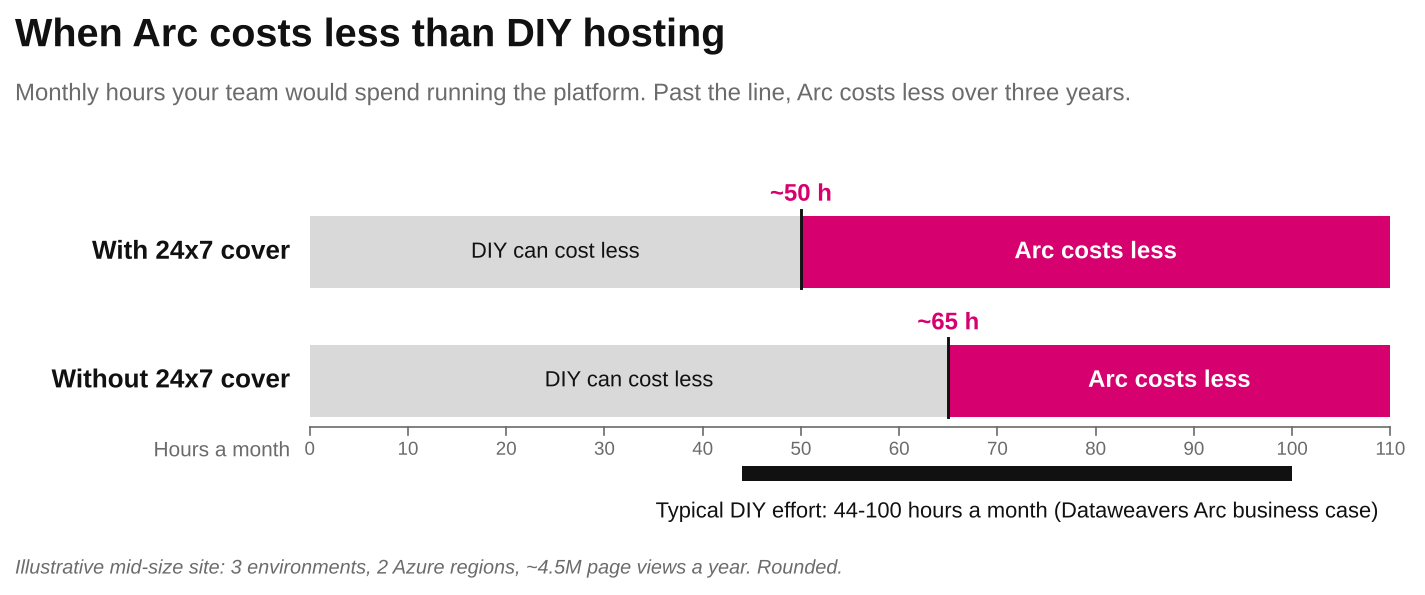
The Dataweavers Arc business case puts real-world effort at 44 to 100 hours a month. So unless your team runs the platform at the very bottom of that range, and covers nights with a stipend rotation rather than a staffed desk, Arc comes out ahead.
Costs the DIY number leaves out
The DIY range above is the generous version. It does not include:
- A staffed 24x7 desk. If on-call isn't enough, covering one seat around the clock takes 4 or more full-time people, roughly $750K a year.
- Time to launch. A DIY build typically takes 3 or more months longer to get a rendering host live.
- Hiring and keeping skills. Azure, Next.js and DXP expertise is hard to hire and harder to keep on platform duty.
- Framework upgrades and outage risk. Next.js and DXP release cycles keep moving, and every outage has a cost the spreadsheet doesn't show.
What you get beyond a lower bill
Cost gets the conversation started. These are the reasons teams usually make the decision:
- A full platform, not just hosting. Front end, APIs, CI/CD, security and observability, all run for you.
- Inside your own Azure tenant. Arc runs in your Azure environment, so it inherits your existing security and governance instead of adding a new audit surface.
- Funded by your Azure commitment. Arc runs in your tenant and is eligible for your Microsoft Azure Consumption Commitment (MACC), so it can draw down budget you already have. Your Microsoft account team can confirm how this applies to you.
- Sovereign cloud hosting. Take your site into regulated markets, including China, the Middle East and Canada. Availability depends on your DXP, so we'll confirm what's possible for yours.
- One SLA, one team. DXP specialists on call 24x7, from code release to customer experience.
Healthcare organizations can also ask Dataweavers to sign a BAA. And if you'd rather not run in your own tenant, Dataweavers can host it all.
How to calculate your own headless hosting TCO
Our numbers are a starting point. To build your own:
- Set your hourly rate. Take your fully loaded engineering cost (salary plus benefits) and divide by working hours a year.
- Estimate set-up hours. Include rendering host, CDN, WAF, pipelines, preview environments and multi-region.
- Estimate monthly ops hours. Count deployments, patching, monitoring, security reviews and incident time. Be honest about the incidents.
- Price Azure consumption. Use the Azure pricing calculator for your environments, regions and traffic.
- Decide how you'll cover 24x7. On-call stipend, staffed desk or no cover, and price it.
- Compare over three years. Put your number next to an Arc quote sized to your sites and traffic.
The real cost of DIY headless hosting
Hosting your own headless front end can look like the cheaper option, especially when the only number on the table is the Azure bill. Once you count the hours to build it, run it, fix it and keep it current, the picture changes. For a typical mid-size site, that comes to roughly $250K to $550K over three years, and more once you add 24x7 cover if needed.
For some teams, DIY is still the right call. If your platform needs very little attention and you don't need out-of-hours cover, the numbers can work. For most teams running a headless CMS at enterprise scale, the hours add up faster than expected. That's when a fully run platform inside your own Azure tenant starts to cost less than doing it yourself.
The only way to know is to run the numbers on your own setup.
Weighing a managed front-end host instead? See our breakdown of front-end hosting TCO.
Get your self-hosting TCO review
Bring us your Azure bills and a rough picture of who works on the platform, how often you release and how often things break. We'll build a three-year TCO for your sites and traffic, and show you how Arc gives you a fully run platform, inside your own Azure tenant, for your budget.